
Petlibro
DESIGNLIBRO INCLifestyle
2.71.02K Reviews
- Version
- 1.8.95
- Installs
- 100.00K
- Age Rating
- Everyone
Screenshots
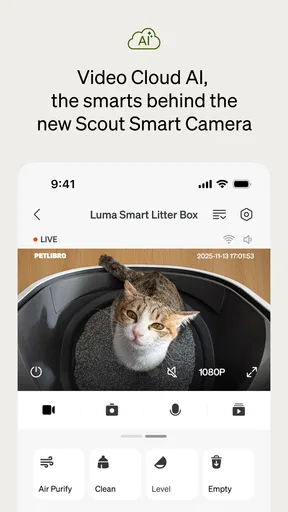
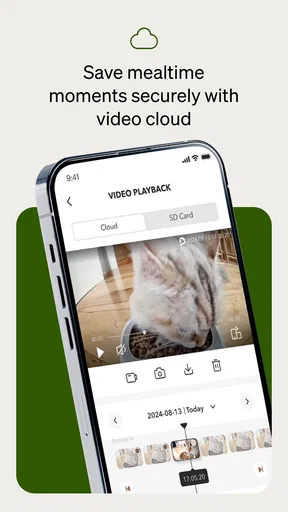
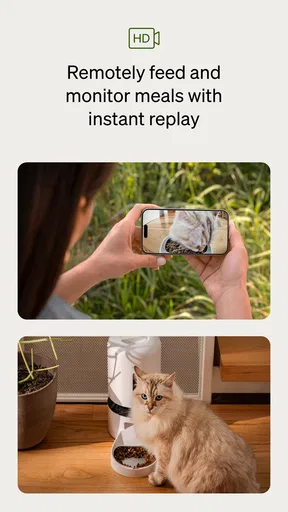
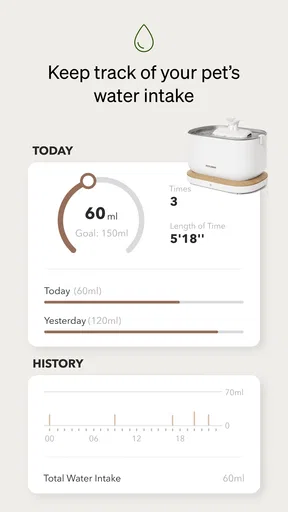
Our Review of Petlibro
 Analysis by Appyee
I judge a pet-care app by how well it fits into ordinary routines, not by how many options it can put on a screen. Petlibro is a free lifestyle app from DESIGNLIBRO INC, built around connected feeders and fountains. Its focus makes it most relevant to people who already use compatible equipment, though the broader pet-care tools may also appeal to owners who want a place to keep routine details. I’d think of it as a companion to hands-on care, not a substitute for checking that a pet has food, water, and attention.
Finding your way around, and what the app is for
Readable navigation matters when you are trying to check a feeding routine quickly rather than explore an app at leisure. The interface felt approachable to me, and the main areas are easy to understand without a long learning period. That simplicity is useful for someone who is less comfortable with technology, although an uncluttered screen alone does not guarantee that every task will be equally easy for every person.
The app is rated for Everyone and is available on devices running Android 7.0 or later. It has a 2.4 average from around 2,600 ratings, a mixed reception that I would take seriously rather than brush aside. Its 100,000-plus installs show that people are using it, but neither installs nor ratings tell you whether it will work smoothly with your particular setup. I’d check that the equipment you intend to use is supported before making the app part of a daily routine.
Navigating the Petlibro Universe
First things first, let's talk about the user experience. When I first opened the Petlibro app, I was greeted with a clean, intuitive interface. It's one of those apps where you don't need a manual to figure things out. Everything is laid out logically, making it easy for even the most tech-challenged among us to navigate.
The main dashboard gives you a quick overview of your pet's needs, from feeding schedules to vet appointments. It's like having a personal assistant for your pets, and honestly, who wouldn't want that?
Features That Stand Out
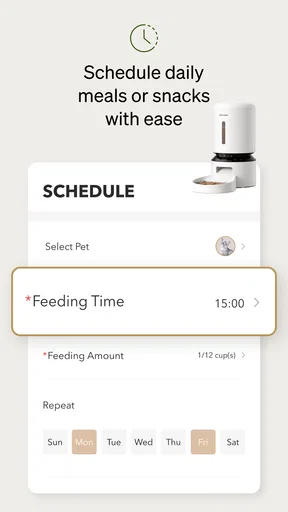
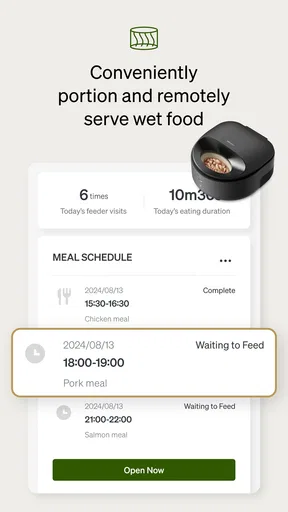
One of the standout features is the feeding schedule. You can set up automated feeding times, which is a game-changer if you're juggling a busy schedule. No more worrying if your furry friend is going hungry while you're stuck in a meeting.
The app also lets you track your pet's health. You can log vet visits, vaccinations, and even set reminders for upcoming appointments. This feature is a lifesaver for someone like me who tends to forget these things.
Then there's the community aspect. Petlibro connects you with other pet owners, allowing you to share tips, experiences, and even find playdates for your pets. It's a fun way to engage with fellow pet lovers and pick up some handy advice along the way.
Customization and Personalization
One of my favorite parts about the app is how customizable it is. You can tailor it to fit the specific needs of your pet. Whether you have a dog, cat, or something a bit more exotic, the app accommodates a variety of animals. You can even add multiple pets and switch between their profiles easily.
The personalization doesn't stop there. You can upload pictures, fill in details like their favorite toys or foods, and even their quirks. It's like creating a mini-biography for your pet, which feels pretty special.
Everyday routines and practical trade-offs
The biggest benefit of a connected feeder is not that it replaces care, but that it can make a recurring task more consistent. For example, if I expect to be home late, a scheduled meal can help keep the routine steady. I would still check the feeder itself before leaving: an app schedule is only useful if the device has food, is powered, and is ready to dispense. That quick physical check is a sensible habit, especially when a pet depends on a particular meal time.
For a household with several pets, profiles can help keep notes from blending together. I’d use one profile per animal and keep entries practical: a food preference, a relevant care reminder, or a detail worth sharing with a sitter. That makes the app more useful than a general notes page, but it also means someone has to keep the information current. A pet-care log is only as reliable as the updates entered into it.
There is a useful distinction between keeping a record and making a health decision. Logging a vaccination or vet visit can help me remember what happened and prepare questions for the next appointment; it does not replace veterinary advice. I would also keep important care details somewhere another household member can reach if they do not use the app. That backup is especially helpful when the person who normally manages the routine is away.
Who benefits most, and when another approach is better
I see the clearest fit for owners who have a compatible connected feeder or fountain and want to manage recurring pet-care tasks alongside device routines. It may also suit people who share care with family or a sitter, provided everyone is comfortable using the same setup. Someone who only wants a simple paper feeding chart, or who prefers not to connect household pet equipment to an app, may find a notebook and a dependable manual routine easier.
Compared with a basic reminder app, this one is more closely tied to connected pet-care hardware and also offers pet profiles and community features. A general calendar, by contrast, can be easier to share across a household and is not tied to a particular pet-care system. The trade-off is clear: choose this app when its equipment connection and pet-focused organization matter to you; choose a standard calendar or written chart if all you need is a prompt and a record.
Before relying on it for an important routine, I would test the schedule while I am at home and confirm that the feeder behaves as expected. I’d also check whether notifications arrive promptly on my device, since notification timing can depend on both the app and phone settings. That small trial is more reassuring than assuming a reminder or scheduled action will work perfectly on the first day.
Motor, sensory, and situational access
For motor access, a straightforward layout can reduce the number of steps involved in checking a routine, but the most important test is whether the controls are comfortable for the person using them. If tapping small controls or entering details is difficult, I’d set up essential information in a quiet moment rather than while rushing out the door. A family member can also help with initial setup, leaving the day-to-day check to whoever is responsible for the pet.
For sensory access, I would not make sound or visual alerts the only signal that a task needs attention. Phone notifications can be missed in a noisy room, during sleep, or when someone does not notice the screen. Pairing app reminders with a household routine—such as checking the device when preparing to leave—offers a practical fallback. This is not a claim about specialized accessibility tools; it is simply a way to avoid depending on one alert channel.
Situational access matters too. If you are traveling, working irregular hours, or handing care to another person, the app may help organize what should happen, but a clear handoff is still essential. I’d tell a sitter what the pet normally eats, what to do if the device does not operate as expected, and where to find backup supplies. The app can support that conversation, but it cannot have it for you.
Room for Improvement
No app is perfect, and Petlibro is no exception. While the app is generally stable, I did experience the occasional glitch. Sometimes, the notifications were delayed, which could be a problem when it comes to time-sensitive tasks like feeding.
Additionally, while the community feature is a great idea, it's still growing. Depending on where you live, you might not find as many local pet owners as you'd hope. But hey, it's an opportunity to expand your network globally, right?
Those limitations affect different people in different ways. A delayed notification may be a minor nuisance if the feeder is simply helping maintain a routine while someone is nearby, but it is a more serious concern if a person expects a phone alert to be the only safeguard. Likewise, a community can be pleasant for exchanging general experiences, yet it is not a replacement for a vet or a reliable local support network. I’d use its social side as an extra, not as the place to settle urgent care questions.
The app is free to download, with in-app purchases ranging from $5.99 to $199.99 per item. I’d look carefully at any purchase screen before committing and decide whether the feature being offered is useful for my own setup. The current version is 1.7.74, but version numbers alone are not a reason to assume every issue is resolved; my own checks of scheduling and notifications would still matter.
Conclusion: Is Petlibro Worth It?
In my opinion, Petlibro is a fantastic tool for any pet owner looking to streamline their pet care routine. Its user-friendly interface, diverse features, and focus on community make it a standout choice. Sure, there are a few kinks to work out, but the overall experience is positive.
If you're ready to give your pet care routine a digital upgrade, I'd say give Petlibro a shot. It might just become your new best friend in managing your pet's needs. Trust me, your fur babies will thank you!
My inclusive verdict
I’d recommend trying it if connected feeding or watering is already part of your plan and you want pet details and recurring care tasks gathered in one place. I’d be more cautious if you need dependable alerts as your sole safety net, rely on a specific accessibility feature, or want a local community to be active where you live. With a simple backup routine and a little testing at home, it can be a helpful companion; without those safeguards, a familiar calendar or direct manual checks may be the better fit.
Verdict
Strengths of Petlibro
- User-friendly interface for easy navigation.
- Highly customizable feeding schedules.
- Reliable connectivity with smart devices.
- Durable design suitable for all pets.
- Real-time notifications for peace of mind.
Limitations of Petlibro
- Initial setup can be a bit complex.
- Limited compatibility with older devices.
- Requires stable internet for full functionality.
- Higher price point compared to competitors.
- App updates can occasionally cause glitches.
Similar Picks in This Category
View All
SmartThings
Samsung Electronics Co., Ltd.4.6

Google Home
Google LLC4.0

Pinterest4.2

Astrotalk - Talk to Astrologer
Astrology & Horoscope4.7

My Verizon
Verizon Consumer Group4.5

Samsung Wallet (Samsung Pay)
Samsung Electronics Co., Ltd.4.1
Frequently Asked Questions
What is Petlibro and how does it work?
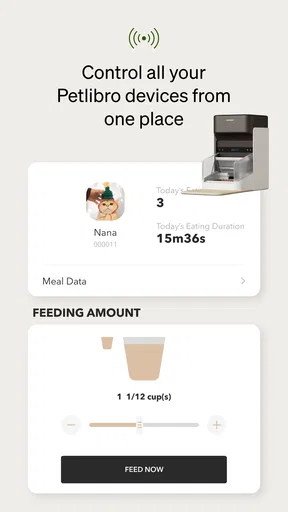
Petlibro is a smart pet feeding app designed to manage and schedule your pet's meals remotely. By connecting with Petlibro devices, users can customize feeding times, portions, and monitor feeding history, ensuring your pet receives the right nutrition even when you're not at home. The app offers real-time updates and alerts to keep you informed.
Is Petlibro compatible with all smartphones?
Petlibro is compatible with both Android and iOS devices. Ensure your smartphone's operating system is up to date to avoid any compatibility issues. The app requires a stable internet connection for seamless operation, allowing you to manage your pet's feeding schedule from anywhere using Wi-Fi or mobile data.
What features does Petlibro offer to enhance pet care?
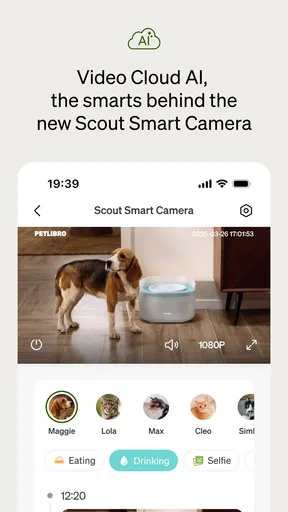
Petlibro offers various features like customizable feeding schedules, portion control, and feeding history tracking. It also provides notifications and alerts to inform you when your pet has been fed or if there are any issues with the device. Additionally, it supports multiple users, making it ideal for families or pet sitters.
How secure is my data with Petlibro?
Petlibro takes user privacy and security seriously. The app uses encryption to protect your data and ensure that your personal information and feeding schedules remain confidential. Regular updates are provided to enhance security features and protect against potential vulnerabilities.
Are there any subscription fees for using Petlibro?
Petlibro does not require any subscription fees for using its basic features. However, there might be premium options available for users seeking additional functionalities or services. It's important to check the app for any in-app purchases or optional features that may incur extra costs.
